Vocabulary notify flashcards 0.1
My friend Marc Jones was kind enough to get the ball rolling on a little coding idea I had. It’s (currently) a small Python script that grabs lines from a tab-separated text file and displays them as little pop-ups using the notify bubbles that most operating systems have.
[caption id="attachment_5876” align="aligncenter” caption="A flashcard for 工资 showing in Linux Mint”]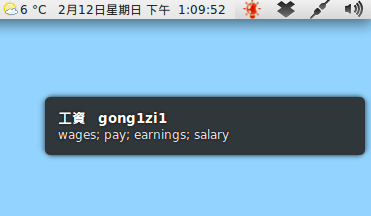 [/caption]
You can see / download the script here:
You run it with:
python txt_file_notifier.py 5
With 5 being the interval between flashcards in minutes. It’s in very, very early stages right now: just the basic functionality and nothing else. You’ll need to put a file called vocab.txt in the same folder. This should be tab-separated, with vocab, reading and definition in that order. E.g.:
正月 zheng1yue4 the first month of the lunar calendar 营 ying2 battalion; encampment; operate; strive for 駕駛 jia4shi3 to drive; to pilot (a ship; an airplane; etc.)
Suggestions and criticisms are very welcome in the comments.
The idea is that you give it your vocab list (e.g. exported from Anki or Skritter) and it displays little flashcards every now and then whilst you get on with other things. It only takes you a second to glance at the pop-up, but you get more chance to see and remember the vocabulary you’re studying throughout the day.
It already has this core functionality, just nothing else. I currently have it set to run at start-up and it works well.
Development ideas
Here’s a few ideas for where I’d like to take this:
- Option to play a sound with each flashcard
- Show images with each flashcard
- More customisation with the interval etc.
- Customise what the pop-up shows from the text file
- Use Anki deck as input
- GUI
Naming
I also need to think of a name for this thing. It should probably be something involving the words “vocab”, “notify” and “flashcards”.
- Vocabify
- Notivo
- Vocabflash
Or something similarly ridiculous.
Give it a try if you like and let me know what you think.
