Input Chinese, Japanese and Korean in Ubuntu
Setting up Ubuntu to type in CJK languages (Chinese, Japanese and Korean) is very straightforward. The first step is to install the Smart Common Input Method.
Installing SCIM
Open up a terminal (ctrl + alt + t) and type:
sudo apt-get install scim scim-m17n
Then go to System → Preferences →SCIM Input Method Setup. The first thing you’ll want to do here is go to _Global Setup _under IMEngine. Every available language is selected, which you probably don’t want, so Disable All and scroll through selecting the ones you need.
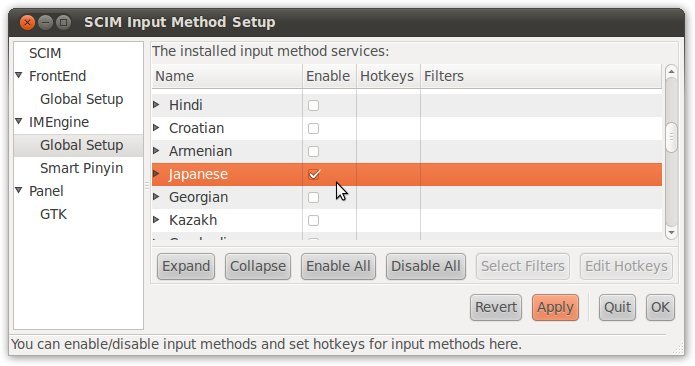
For Mandarin Chinese, select Chinese (simplified) even if you want to type traditional Chinese characters - this option covers both.
SCIM’s appearance
You might also want to play around with the look and feel of SCIM. You can do this on GTK under Panel.
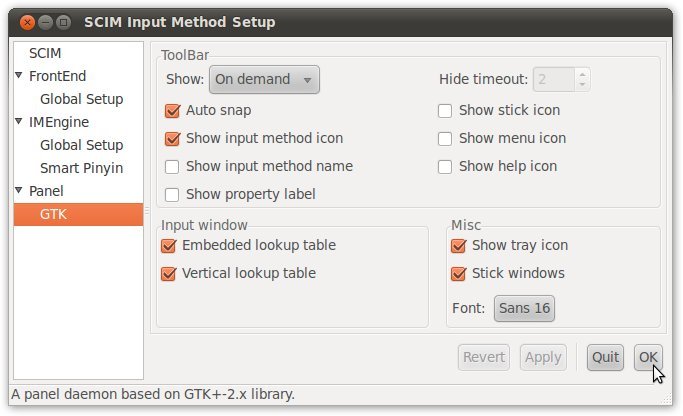 I’d recommend increasing the font size to make it easier to recognise complex characters, and deselecting all of the Show options apart from Show input method icon, just to declutter it a bit.
Using SCIM
Now you’re ready to go. Whenever you want to type a CJK language, just press ctrl + space. SCIM will pop up and enable you to select languages and type them.

When you want to go back to English, just press ctrl + space again.
Smart Pinyin (智能拼音)
The easiest Chinese input method is probably Smart Pinyin, which you need to install separately:
sudo apt-get install scim-pinyin
