Understand Anki's structure and improve your SRS study
Note: the information here applies to Anki 1, not Anki 2
Most people I know who study Chinese use Anki. If you’re not aware of Anki, then read this explanation of SRS and get started as soon as possible!
However, I’ve noticed that even people who’ve been using Anki for a while tend not to make the most of it. Anki has a lot more to offer if you get to grips with the details.
This guide might seem obvious to experienced Anki users, but I would have appreciated a clear explanation when I started using it. The user guide makes complete sense to me now, but wasn’t so helpful at the time. With that in mind, here’s a step-by-step walk through!
Models
The most important part of Anki’s structure is models. They’re pretty much all you need to figure out to get the most out of Anki. Models are the way you set up Anki, the way you customise it. In a way, models are the structure of Anki.
Basic model
When you create a new deck in Anki, it’s set up in the basic model. As the name suggests, this is a straight-forward, easy-to-understand model that lets you get started.
In the basic model, there’s a front and a back. These are very intuitive: one is the front of your flashcard (i.e. the question side) and one is back (the answer). This makes it easy to type in the stuff you want to see on each side of your flashcards and begin studying.
But the basic model is actually misleading as to how Anki is best used. Here’s why:
- It makes you think that fields are the same thing as sides of the flashcard, or questions / answers. They’re not, and I’ll explain why below.
- It makes you think you can only have two fields per fact. Again, this is not the case.
- It makes you manually arrange information into questions and answers, when Anki is really designed to handle information in its own structure. This sounds a bit academic and complicated, but it’s actually easy to get the hang of.
If that didn’t make a lot of sense to you, it’s because you’ve been using the basic model for too long! Time for a change! Read on to find out how to _really _use Anki.
Anki’s structure explained
Let’s go through Anki’s structure step-by-step, from the bottom up. We’ll use the example of studying Chinese characters here.
Fields
The smallest chunk in the Anki structure is a field. Rather than being one side of the card, as the basic model suggests, a field is actually a space for one kind of information or detail. In our Chinese characters example, we might have these fields:
Character Pronunciation Meaning
So for 你, we’d fill in the fields like this:
_Character: _你 Pronunciation: nǐ Meaning: you
Now you should be able to see what I mean about Anki handling information in its own structure. Each field is for a particular detail from the same piece of information. In this case, the information is that the character 你 is pronounced nǐ and means “you”. Each of these gets its own field.
Facts
That little set of information is called a fact. Each fact is made up of fields. So in our Chinese characters example, we have one fact per character. Each fact has a field for the character, its pronunciation and its meaning. Here are a couple more facts, just to make this clearer:
_Character: _我 Pronunciation: wǒ Meaning: me
_Character: _不 Pronunciation: bù Meaning: not
You can see that fields are not the same thing as the front and back of flashcards. There aren’t even fields for front and back, because we don’t need them.
Templates
We don’t need fields for the front and back of cards because we have templates. Templates let you arrange fields onto the front and back of cards. So a template has a front and a back, but a fact doesn’t.
For our Chinese characters example, we might want three templates:
Character → Pronunciation
Character → Meaning
Meaning → Character
Each of these templates is a question / answer pair. The question is on the left and the answer is on the right. The arrows indicate what we’re being prompted to do by each card: see a character and give the pronunciation, etc.
And here’s how we would set up those templates:
| Template | Question | Answer |
|---|---|---|
| *_Character_ → _Pronunciation_* | What's the pronunciation for [_character_]? | [_character_] is pronounced [_pronunciation_] |
| *_Character_ → _Meaning_* | What's the meaning of [_character_]? | [_character_] means [_meaning_] |
| *_Meaning_ → _Character_* | What character means [_meaning_]? | [_character_] means [_meaning_] |
In each of these, the bit in square brackets, [blah], is a space that Anki will fill with the appropriate field from each fact. So for the 你 fact, you’d get three flashcards:
| Template | Question | Answer |
|---|---|---|
| *_Character_ → _Pronunciation_* | What's the pronunciation for *你*? | *你* is pronounced *nǐ* |
| *_Character_ → _Meaning_* | What's the meaning of *你*? | *你* means *you* |
| *_Meaning_ → _Character_* | What character means *you*? | *你* means *you* |
You might have already spotted the advantage to this approach. We only need to fill in the information for each character once (fill in the fields for each fact). Because the templates are set up like this, all of the question / answer pairs are made automatically. This is a much more elegant, efficient approach.
It also makes editing and maintaining everything a lot easier. If you notice that the pronunciation for one of the characters is wrong, you just go in and edit that field in that fact. All of the cards are changed automatically, because of the field ⇒ fact ⇒ template structure.
Similarly, you can easily have consistent wording across the cards, and change it without any hassle.
Cards
Cards are one of the easier parts of Anki to understand. A card is a flashcard just like a real, paper one. It has a front and a back. In other words, a card is a question / answer pair. As you saw above, cards are based on templates.
Where it starts to get tricky is the relationship between cards and facts. At first it’s difficult to grasp what the difference between the two is.
Hopefully looking at the Chinese character facts above and the templates that use them has made this a bit clearer. Templates organise fields into questions and answers, and then you study cards that follow those templates.
Model
We’re on the home run now! A model is just a set of templates. This is the main idea with Anki’s structure. A model is a group of card templates that lets you create and manage cards based on facts. So our three templates for the Chinese character facts make up a model. This model could then be used to study Chinese characters.
Deck
Quite simply, a deck includes all of the above. It’s made up of one or more models, which contain templates based on facts, etc. Most people have one model per deck, which is easy to keep track of.
Here’s a quick recap of it all:
That’s all great, but how do I actually use this?
That’s the theory, now let’s look at how you’d actually set up this Chinese character deck in Anki.
First create a new deck.
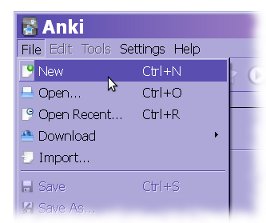
Name the new deck whatever you like. Now you’re on the ‘Add Material’ screen. Before you add material, go to Deck Properties in the Settings menu.
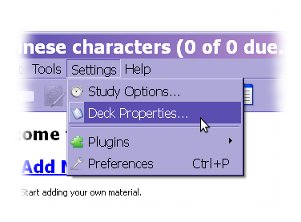
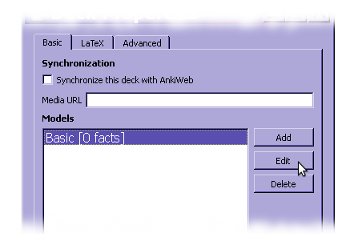
You’ll get a screen showing you the models in that deck. For now there’s just the ‘Basic’ model. We’re going to edit that to suit our needs.
Now you’re on a screen with the templates in that model. Notice how we’re working our way down through the structure shown above? First click the ‘Reverse’ template and then delete.
Rename the ‘Forward’ to ‘Character → Pronunciation’ as in the example above. Add two more templates and name them ‘Character → Meaning’ and ‘Meaning → Character’. Remember that the names of the templates aren’t important, they’re just labels to keep track of what’s what.
You should have something like this:
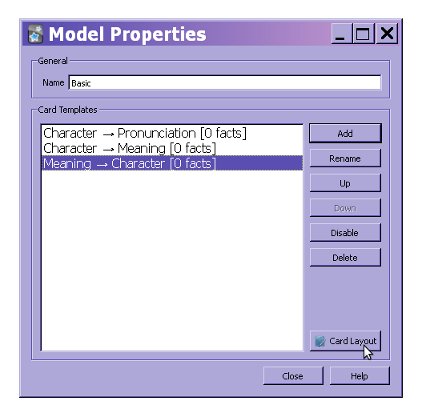
Click on ‘Card Layout’, and go to the ‘Fields’ tab.
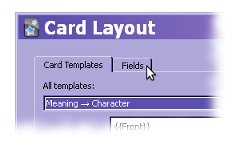
We can set up the three fields we want for each Chinese character fact. Rename and add fields until you’ve got this:

You can arrange these fields onto the templates you set up earlier. Go back to the ‘Card Templates’ tab. Select one of the templates from the drop-down list, and fill in the ‘Question’ and ‘Answer’ field as shown in the example. Fields are formatted like this: {{Field}}. Ignore the sample on the right for now.
You’ll end up with templates like this:
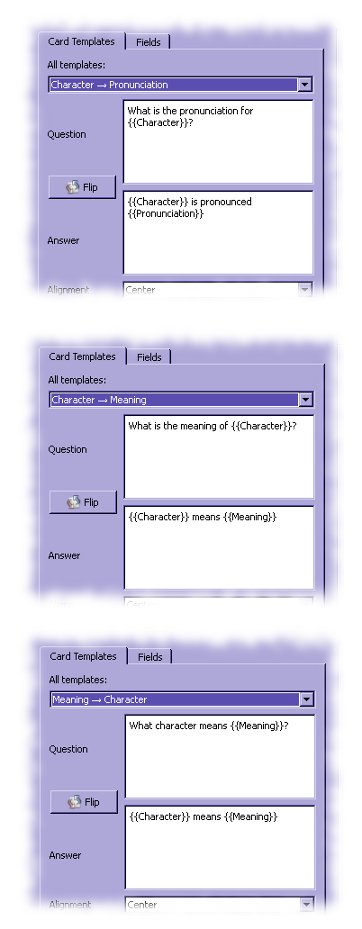
And you’ve finished setting up the deck! It seems like a bit of a pain, but remember that you’ve only got to do this once and then you can benefit from the deck forever.
Now go back to the main screen for the deck, and click the green plus icon to add facts.
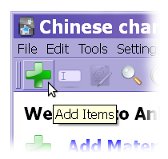
Now you can just type in the information for each character into the fields provided. Anki will take care of everything else.
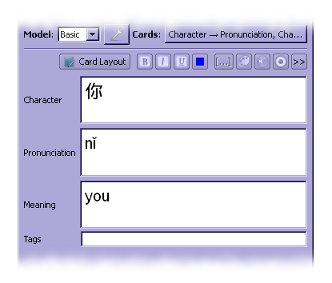
Have a look at the drop-down in the top right. Here you can see that three cards are being added every time you fill in a fact (one card for each template).
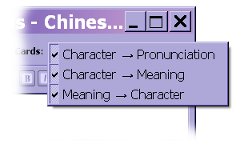
So with this approach you never actually add a card directly. You just add information, and Anki sorts it all out for you. This is how you make best use of the software.
The Chinese characters deck demonstrated here is just an example. You can use this approach to make decks for anything, and let Anki understand the structure of the information you’re studying. Then it’ll be at its most efficient.
